
Is Your IT Working For You, Or Waiting For Everything To Crash?
How businesses stop firefighting, catch issues before they hurt productivity, and build a stable IT model with Tier 1, Tier 2, and managed services.

A practical business guide to preventing IT problems, handling support requests faster, and building a support model that scales with your company.
Most businesses only think about IT support when something breaks: a user cannot access email, a laptop stops working, the internet drops, or a critical system becomes unavailable.
That model is reactive. It solves the visible problem, but it does not always address the cause behind it.
Proactive IT support is different. Instead of waiting for issues to interrupt the business, a proactive IT service focuses on monitoring, prevention, maintenance, security, and structured escalation. The goal is simple: reduce downtime, improve user productivity, and keep the business running smoothly.
For growing companies, this is where Tier 1 support, Tier 2 support, and managed IT services become important. Each layer has a clear role, and when they work together properly, IT becomes more predictable, more secure, and easier to manage.
What Is Proactive IT Support?
Proactive IT support is an approach to IT management that focuses on preventing issues before they become business problems.
Instead of only responding to support tickets, a proactive IT provider continuously reviews the environment, monitors systems, patches devices, checks backups, reviews alerts, manages access, and looks for signs of risk.
In simple terms: reactive IT support fixes problems after they happen. Proactive IT support works to stop problems before they affect the business.
A proactive support model usually includes:
- Monitoring workstations, servers, cloud services, and network availability
- Managing Microsoft 365, user accounts, permissions, and security policies
- Applying updates, patches, and configuration improvements
- Reviewing alerts before they become major incidents
- Checking backup status and recovery readiness
- Improving endpoint protection and access control
- Creating clear escalation paths for technical issues
Proactive IT Support vs Reactive IT Support
Reactive IT support is useful, but it is limited. The business reports a problem, the IT team investigates, and a technician fixes the issue. That may work for small incidents, but it becomes expensive when the same problems happen repeatedly.
Proactive IT support adds structure. It looks for patterns, root causes, and recurring risks.
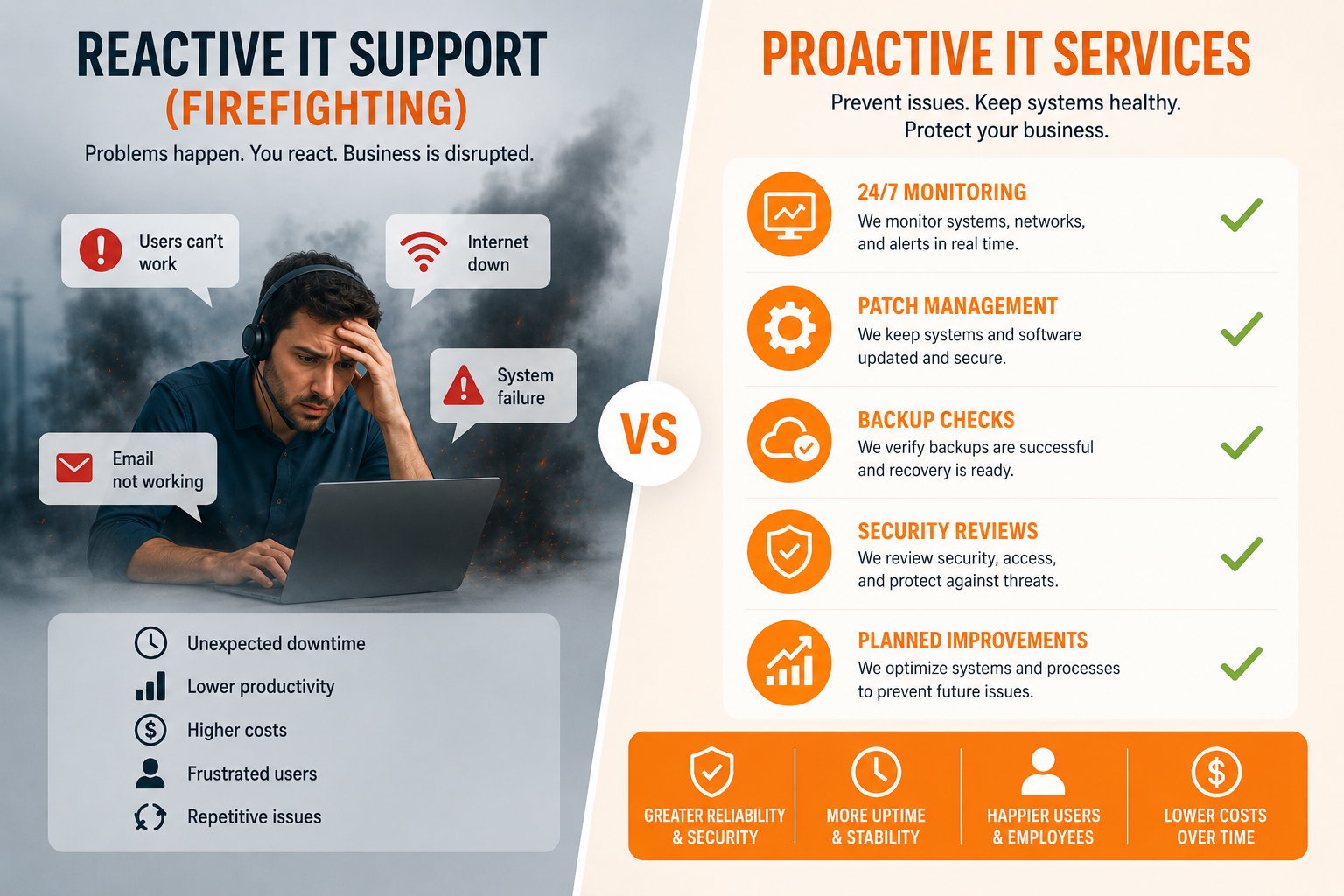
| Reactive IT Support | Proactive IT Support |
|---|---|
| Responds when users report a problem | Monitors systems before users are affected |
| Focuses on fixing the immediate issue | Focuses on preventing recurrence |
| Often depends on user complaints | Uses alerts, reports, reviews, and maintenance |
| Can lead to repeated disruptions | Reduces downtime and improves stability |
| Usually short-term and ticket-based | Long-term, structured, and strategic |
For business owners and managers, the difference is not just technical. It affects productivity, customer service, employee satisfaction, and operational continuity.
What Is Tier 1 Support?
Tier 1 support is the first line of IT support. It handles common, repeatable, and user-facing issues.
This is usually where helpdesk support begins. The goal of Tier 1 support is to respond quickly, resolve standard issues, and make sure users can continue working.
Common Tier 1 support requests include:
- Password resets and account unlocks
- Basic Microsoft 365 and Outlook issues
- Printer and peripheral problems
- Basic workstation troubleshooting
- VPN or remote access assistance
- Software installation requests
- User guidance for standard business applications
Tier 1 support is important because it protects the business from small problems becoming productivity blockers. A strong Tier 1 team should be fast, organized, and service-oriented.
What Is Tier 2 Support?
Tier 2 support handles issues that are more complex, technical, or require deeper investigation. When Tier 1 cannot resolve a problem using standard procedures, the ticket is escalated to Tier 2.
Tier 2 support usually deals with the root cause, not only the symptom. For a slow work computer, see how to identify whether the problem is the PC, network or business system.
Common Tier 2 support issues include:
- Advanced Microsoft 365 configuration issues
- Complex workstation or operating system problems
- Network troubleshooting and connectivity analysis
- Server, cloud, or infrastructure-related incidents
- Security alerts that require investigation
- Recurring issues that need root-cause analysis
- Escalated incidents affecting multiple users
Tier 2 support is where technical depth matters. It connects day-to-day helpdesk activity with infrastructure, security, cloud services, and business continuity.
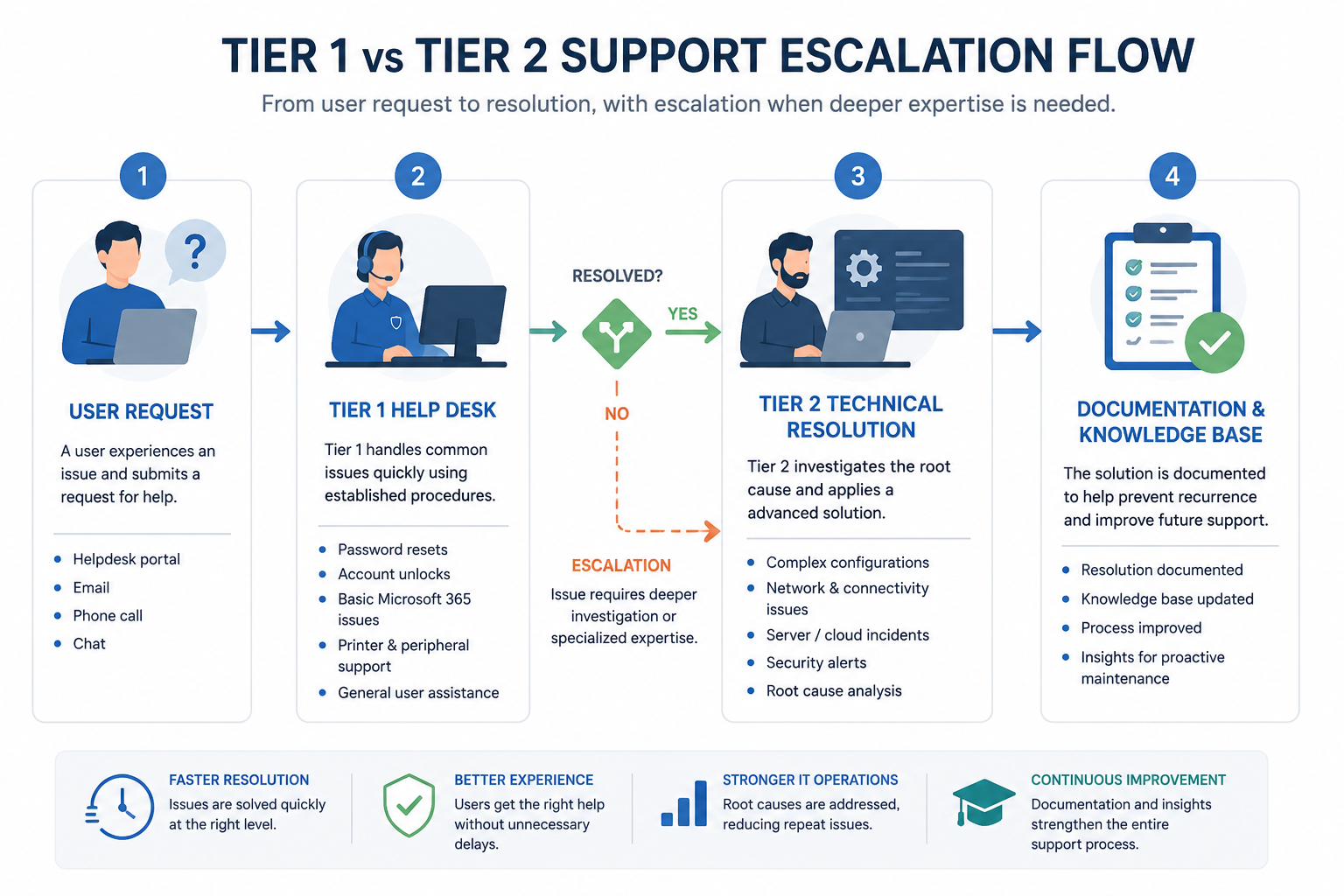
How Tier 1 and Tier 2 Support Work Together
Tier 1 and Tier 2 support should not operate as disconnected teams. They should be part of one structured support process.
A healthy IT support model usually works like this:
- Tier 1 receives the request and handles common issues quickly.
- If the issue is complex or recurring, it is escalated to Tier 2.
- Tier 2 investigates the root cause and applies a deeper technical fix.
- The solution is documented so similar issues can be resolved faster in the future.
- Recurring issues are reviewed as part of proactive maintenance and improvement.
This structure improves response time, reduces repeated tickets, and helps the business understand where IT problems are really coming from.
Where Proactive IT Service Makes the Difference
A reactive provider waits for tickets. A proactive IT service reviews the entire environment and asks better questions:
- Are users opening too many avoidable tickets?
- Are devices missing updates?
- Are backups completing successfully?
- Are there repeated Microsoft 365 issues?
- Are permissions and access still correct?
- Are alerts being reviewed before they become incidents?
- Are there systems that need lifecycle planning or replacement?
This is the difference between solving one problem and improving the IT environment as a whole.
What Managed IT Services Should Include
Managed IT services should go beyond basic helpdesk support. A strong provider should combine support, monitoring, maintenance, security, and planning.
| Service Area | What It Should Include |
|---|---|
| Helpdesk support | Fast response for user issues, access problems, software support, and standard troubleshooting. |
| Tier 2 escalation | Advanced technical handling for complex, recurring, or business-impacting issues. |
| Monitoring | Ongoing visibility into endpoints, servers, network, cloud services, and key alerts. |
| Security | Endpoint protection, access control, Microsoft 365 hardening, MFA, and security review. |
| Backup and recovery | Backup monitoring, recovery planning, and periodic restore testing. |
| IT roadmap | Lifecycle planning, licensing review, security improvement, and technology alignment with business needs. |
Signs Your Business Is Stuck in Reactive IT
Many companies do not realize they are operating reactively until IT starts affecting daily work. Common warning signs include:
- The same issues keep coming back every week.
- Users complain about slow response times or unclear ownership.
- There is no structured escalation process between Tier 1 and Tier 2 support.
- Backups exist, but no one regularly tests recovery.
- Microsoft 365 permissions and licenses are not reviewed regularly.
- Security alerts are handled only after there is a visible problem.
- IT decisions are made only when something breaks.
If these issues sound familiar, the business may need to move from basic support to a proactive managed IT model.
Why Proactive IT Support Matters for Business Growth
As a company grows, IT complexity grows with it. More employees, more devices, more cloud services, more permissions, more vendors, and more security risks.
Without a proactive structure, IT becomes harder to control. Small issues become recurring problems, users lose time, and management loses visibility.
A proactive IT support model helps businesses:
- Reduce downtime and avoid repeated disruptions
- Improve employee productivity and user satisfaction
- Strengthen Microsoft 365 and endpoint security
- Create clear support ownership and escalation paths
- Protect data through backup monitoring and recovery planning
- Plan IT budgets and upgrades more effectively
- Move from firefighting to structured IT management
The Bottom Line
Tier 1 support solves everyday user issues. Tier 2 support handles deeper technical problems. Proactive IT support connects both layers into a stronger, more reliable service model.
The real value is not only faster ticket resolution. The real value is fewer preventable issues, better visibility, stronger security, and a more stable business environment.
For businesses that rely on Microsoft 365, cloud services, endpoints, and secure remote access, proactive IT support is no longer optional. It is the foundation for reliable operations.
Need a More Proactive IT Support Model?
At 1iT, with over 30 years of experience, we help businesses move from reactive IT support to a proactive managed IT service model.
Our team supports users, manages Microsoft 365 environments, monitors infrastructure, handles escalation, improves security, and helps organizations reduce downtime through structured IT management.
Not sure if your IT support is too reactive? Talk to us for a proactive IT support review.