
Can Someone Send Emails as Your Company? DMARC Can Stop It
A simple business guide to SPF, DKIM, DMARC, and why protecting your email domain is essential to prevent spoofing, payment fraud, and brand damage.
A simple business guide to SPF, DKIM, DMARC, and why email domain protection matters.
Email is one of the most trusted communication tools in business. Customers receive invoices by email. Employees approve payments by email. Suppliers confirm orders by email. Management teams make decisions by email.
That trust is exactly why attackers target it.
Many businesses invest in spam filters, antivirus tools, and firewalls, but overlook one important question:
Can someone send an email that looks like it came from your company, even if they do not have access to your mailbox?
In many cases, the answer is yes.
This is called domain spoofing, and it is one of the most dangerous email security risks for modern businesses.
What Is Domain Spoofing?
Domain spoofing happens when an attacker sends an email that appears to come from your company's domain.
For example, a customer may receive an email that looks like it came from finance@yourcompany.com or ceo@yourcompany.com. The message may ask for payment, request sensitive information, or send a malicious link. To the recipient, it may look legitimate because the sender appears to be your company.
The problem is simple: traditional email was designed for delivery, not identity verification. By default, email systems do not automatically prove that a sender is truly allowed to send messages on behalf of a domain.
That creates an opening for attackers.
Why This Is a Business Problem, Not Just an IT Problem
Domain spoofing is not just a technical issue. It can directly damage your business:
- Payment fraud
- Phishing attacks
- Compromised customer trust
- Reputational damage
- Legal and compliance exposure
- Confusion between your company and your clients or suppliers
If an attacker sends a fraudulent invoice using your company's domain, your customer may believe the request is real. If a supplier receives fake instructions from someone pretending to be your finance team, they may act on them. If your brand becomes associated with phishing emails, your reputation can suffer even if your internal mailbox was never breached.
That is why protecting your domain identity is critical.
Spam Filters Are Important, But Not Enough
Many companies assume their spam filter will catch these attacks. Spam filters are important, but they are not designed to fully solve domain identity. They inspect messages and try to detect suspicious content, links, attachments, or behavior.
But domain spoofing requires a different type of protection.
The key question is not only: Does this email look suspicious?
The better question is: Is this sender actually authorized to send email for this domain?
That is where SPF, DKIM, and DMARC come in.
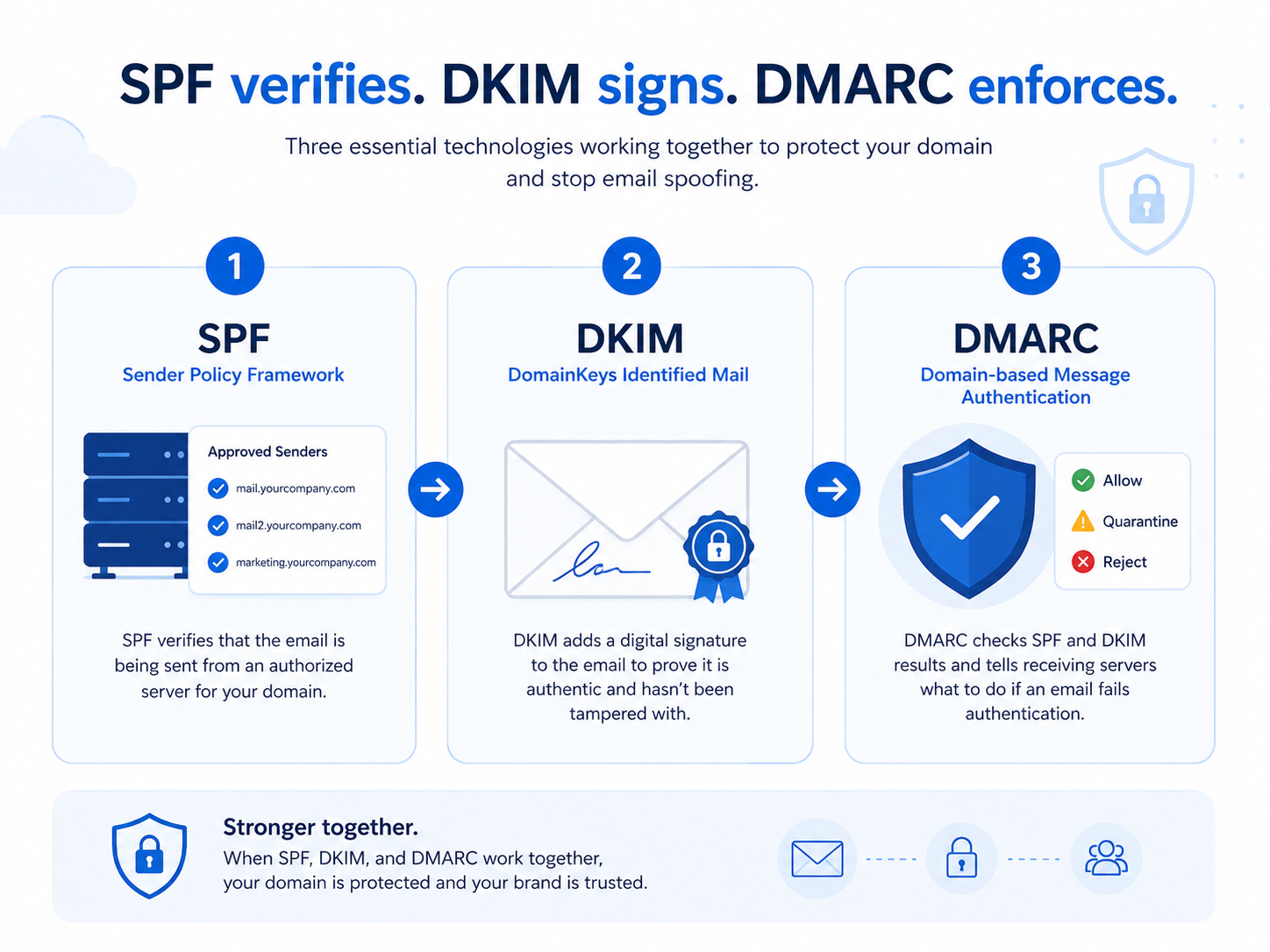
SPF, DKIM, and DMARC Explained Simply
To protect your company from domain spoofing, three email authentication technologies need to work together.
SPF: Sender Policy Framework
SPF is like an approved sender list. It tells the world which servers are allowed to send email on behalf of your domain. For example, your company may authorize Microsoft 365, a CRM system, a marketing platform, or an invoicing platform to send emails.
DKIM: DomainKeys Identified Mail
DKIM adds a digital signature to outgoing emails. This helps receiving mail servers verify that the email was not changed during delivery and that it was signed by an approved system.
DMARC: Domain-based Message Authentication, Reporting, and Conformance
DMARC is the policy layer. It tells receiving mail servers what to do when an email fails authentication checks. This is where real protection begins.
The Problem with p=none
Many companies technically have DMARC configured, but their policy is set to p=none. This means the company receives reports, but unauthenticated emails are not blocked.
In simple terms: p=none means you are watching the problem, not stopping it.
This can be useful as a starting point because it allows the business to understand who is sending email on behalf of the domain. But if the company stays on p=none for too long, attackers may still be able to spoof the domain. To actually reduce the risk, the domain needs to move toward enforcement, from monitoring to action.
| DMARC Policy | Meaning |
|---|---|
| p=none | Monitor only. Do not block anything. |
| p=quarantine | Send suspicious emails to spam or junk. |
| p=reject | Block unauthenticated emails completely. |
Why You Should Not Jump Straight to p=reject
At first glance, it may sound simple: just change the DMARC policy to p=reject and block everything suspicious. In practice, this can be risky.
Many companies send email from multiple systems, such as Microsoft 365, CRM platforms, marketing tools, billing systems, helpdesk platforms, website contact forms, automation tools, and third-party applications.
If these systems are not properly authenticated before DMARC enforcement, legitimate emails may be blocked. That can cause serious business disruption. Invoices may not reach customers. Marketing campaigns may fail. Support notifications may not be delivered. Client communication may be interrupted.
This is why DMARC needs to be handled as a managed process, not just a one-time DNS change.
Why Managed DMARC Matters
DMARC is not a set-and-forget setting. It requires visibility, analysis, and ongoing management.
A proper managed DMARC process includes:
- Reviewing all systems that send email for your domain
- Identifying legitimate and unauthorized senders
- Fixing SPF and DKIM alignment
- Monitoring DMARC reports
- Gradually moving toward stricter enforcement
- Keeping the configuration updated when new tools are added
- Making sure legitimate business emails continue to be delivered
This is especially important because companies constantly add new platforms. A marketing team may connect a newsletter tool. A finance team may start using a new invoicing platform. A support team may add a helpdesk system. Each of these systems may need to be authenticated correctly.
Without ongoing management, email authentication can break over time.
Real-World Example: Moving from Monitoring to Protection
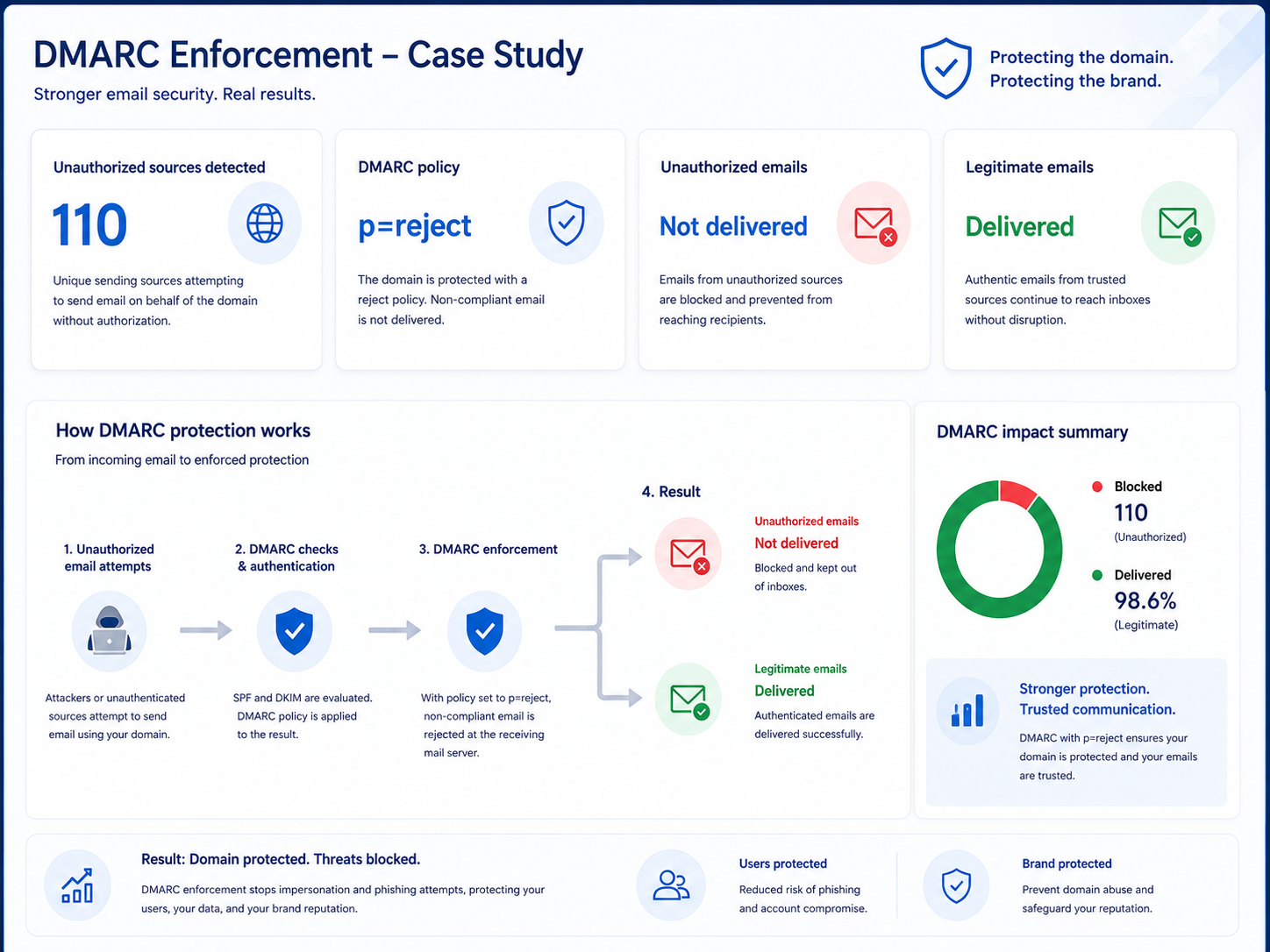
In one managed DMARC project, 1iT helped a global technology services provider move from passive monitoring to active protection.
The client had a DMARC policy of p=none, meaning they could see reports but were not actively blocking unauthorized senders.
1iT reviewed the client's email traffic, identified legitimate business systems, and aligned approved senders with SPF and DKIM requirements. Once the legitimate sending sources were properly configured, the domain could move toward active enforcement.
During one reporting period, 110 malicious or unknown sources attempted to send emails using the client's domain. With DMARC enforcement in place, those unauthorized emails were blocked instead of being delivered to customers or partners.
Your Domain Is Part of Your Brand
Your company's domain is not just a technical asset. It is part of your identity. Customers trust it. Suppliers recognize it. Employees use it every day. Partners rely on it for communication.
If attackers can send emails that appear to come from your domain, they can abuse that trust.
DMARC helps close that gap. It gives your business a way to tell the world: If this email is not properly authenticated, do not trust it.
The Bottom Line
Email security is not only about protecting inboxes. It is also about protecting the identity of your business.
SPF, DKIM, and DMARC help prevent attackers from abusing your domain and sending fraudulent emails in your company's name. But DMARC must be implemented carefully. Moving too quickly can block legitimate emails. Moving too slowly can leave your domain exposed.
A managed approach gives your business the right balance: stronger protection, controlled enforcement, and reduced risk of email disruption.
Related posts

Patch Management Best Practices: Why Businesses Miss the Basics
A comprehensive guide to patch management best practices. Learn why companies fail, common errors, and how to secure your business effectively.
Microsoft 365 Expands Mailboxes to 100GB: What You Need to Know
Microsoft doubles Exchange Online primary mailbox storage from 50GB to 100GB for Microsoft 365 Business plans. Learn who is eligible and key checks.