
Work Laptop Stolen: Actions for Employees and Businesses
Steps for a lost or stolen work laptop: restrict accounts, verify encryption, assess remote erasure, report the incident and resume work safely.

A stolen work laptop can expose customer files and access to business systems. If your work laptop is stolen, notify IT and your manager and start documenting the incident from a trusted device. At the same time, check exposed accounts, encryption status and available options for handling the computer.
Updated: November 1, 2026.
1. Initial reporting and assigning responsibilities
1.1 Employees: initial report
Notify IT and your direct manager immediately, even if details are missing. Use the template in section 1.4 to keep the information together instead of sending different versions. Do not include passwords or recovery keys in the message. If a possible location of the computer becomes available, pass it to the police and do not try to confront the thief.
1.2 Incident lead: assigning responsibilities and preserving evidence
Open a central record and assign each task an owner and completion criteria. Preserve reporting and action times, management approvals and available evidence. Distinguish facts from assumptions and restrict access to the incident file as needed. Decide who will update employees and management and who will coordinate decisions.
1.3 Management: documentation for the police and insurer
Gather the serial number, invoice, computer description and available evidence. Keep the police report acknowledgment and check the insurer's requirements and the notification deadlines in the specific agreement.
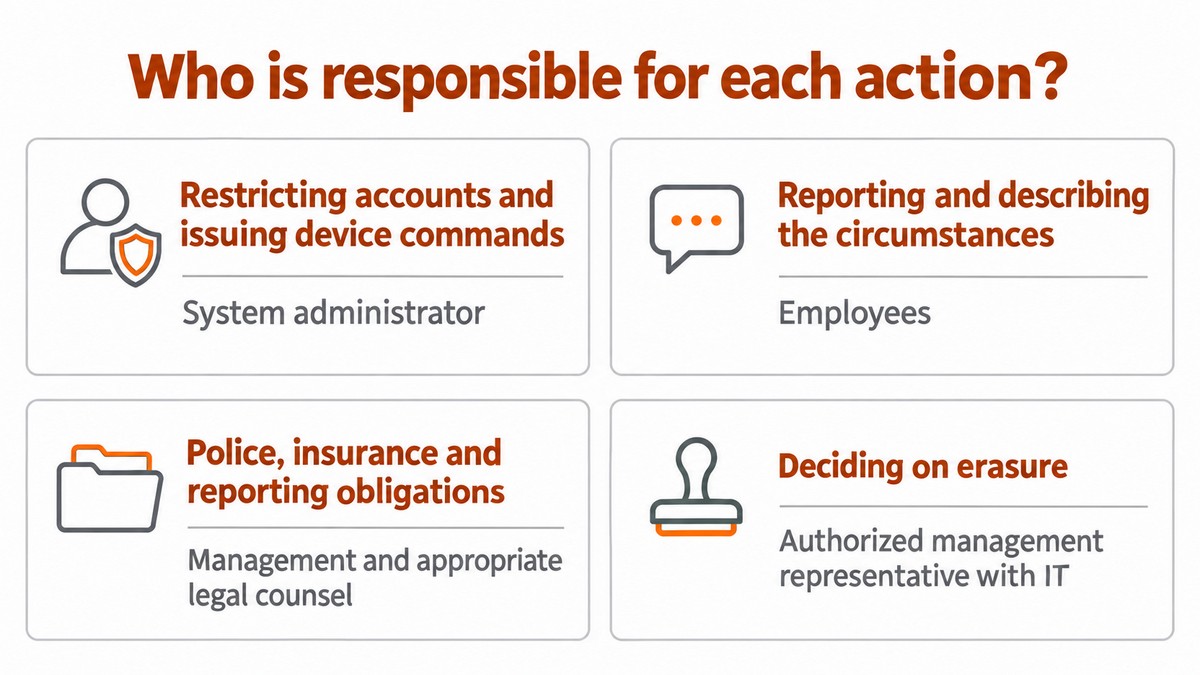
Action | Responsible for execution or approval | Evidence of completion |
|---|---|---|
Report and description of circumstances | Employees | Message and time received |
Account restrictions and device commands | Administrator | Action log and statuses |
Decision to erase | Authorized management representative with IT | Recorded approval and rationale |
Police, insurance and reporting obligations review | Management and appropriate legal adviser | Supporting records and reporting decision |
1.4 Employees: completing the report template
Work computer lost or stolen. Provide the employee's name and an alternative phone number; the time and place of the incident; when the computer was last used; the model and serial number, if known; the operating system; the computer's state at the time of the incident; systems left open; sensitive local files; other equipment stolen; and actions already taken. Mark unknown details and add them later.
2. Restricting accounts and verifying disconnection
The administrator checks how to restrict access, revoke sessions and address potentially exposed credentials in each service. Determine the scope of action based on the circumstances of the incident and available permissions, and document how completion will be verified.
2.1 Administrator: restricting access to corporate services
Map the email, cloud storage, VPN, password manager, customer systems and administrator accounts that were available. For each service, check the provider's instructions for restricting access and revoking sessions. Document what changed, who made the change and when, and what still requires verification. Consult the Microsoft Entra guidance for your organization's environment.
2.2 Employees in coordination with IT: handling personal accounts
List the personal accounts that were in use and handle them separately according to each provider's instructions. Check potentially exposed credentials and consult Google's guidance for a lost device. Document completion without sharing personal passwords with the business.
3. Assessing protection based on encryption and computer state
3.1 Administrator: gathering evidence of encryption status
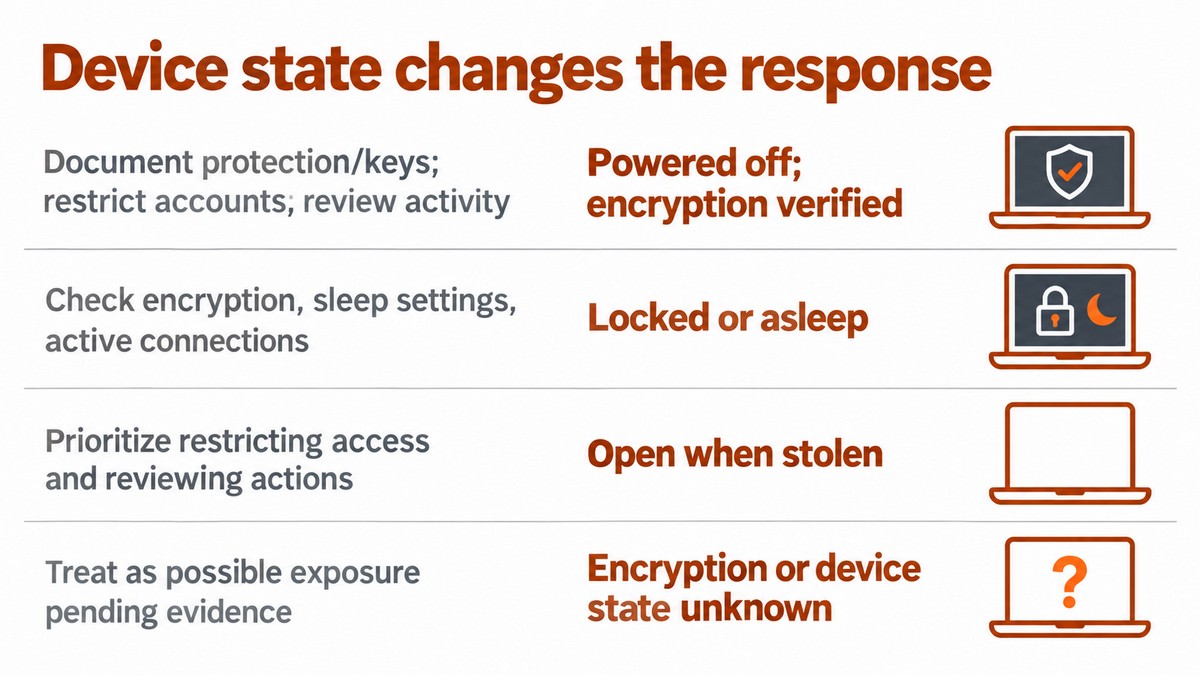
Check the latest encryption report, its date and the documented protection settings. Separately gather information about the computer's state when it went missing and the accounts available on it. If there is no current evidence, record the status as "unknown" and assign someone to complete the check. Store recovery keys in a location with restricted access, separate from the general incident file.
3.2 Management and IT: deciding how to proceed based on the evidence
- Current evidence is available: Document its source and date, and pass it on for the exposure assessment.
- Information is partial or conflicting: Distinguish employees' reports from device management data.
- Evidence is insufficient: Document the uncertainty and do not conclude the exposure review based on an assumption.
4. Remote location, locking and erasure
4.1 Administrator: checking the available method
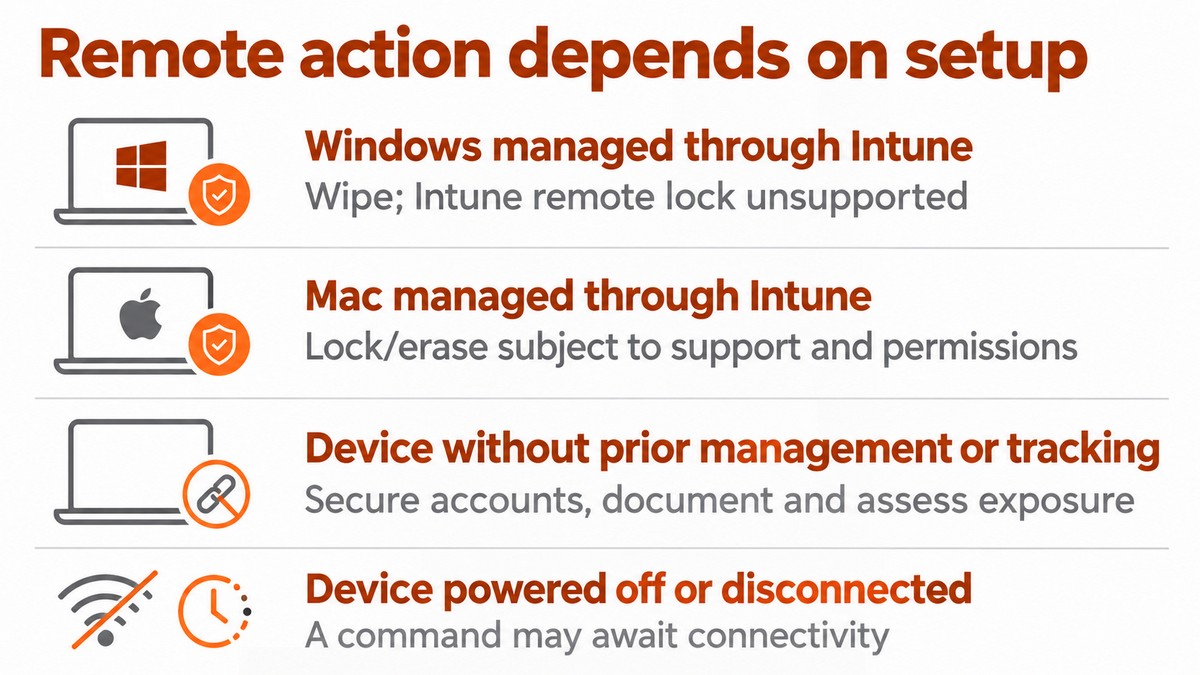
Check management records and the manufacturer's documentation to establish which method was configured for the computer and which actions are available to the authorized administrator. Verify the operating system, management enrollment, permissions and relevant licensing. Use the Intune action documentation to check the requirements, and do not send a command simply because its name appears in the interface.
4.2 Management and IT: approving erasure and choosing the action
Management approves erasure based on data sensitivity, evidence needs and the local data that could be lost. Preserve available evidence before the action without delaying necessary protection. Wipe in Intune is intended to reset the device; check its behavior and the options for the platform before approval. Do not assume that data without a backup can be recovered.
5.7 Incident lead: verifying completion
Assign owners and deadlines for addressing gaps in encryption, device management and recovery testing. For further planning, see device management, cloud backup and preparations for reporting responsibilities.
5.6 Management and IT: defining follow-up actions
Prepare a replacement computer and restore data from an available backup in accordance with the service terms and permissions. Check with employees that they can open the files, email and systems required for their roles. Document what was restored, what is missing and which limitations remain. The scope and timing of recovery depend on the existing backup, its integrity and the agreed terms.
5.5 Administrator and employees: restoring data and approving the return to work
When needed, check the relevant official assistance and reporting channels, including the Israel National Cyber Directorate. Distinguish requests for assistance from the review of the business's reporting obligations.
5.4 Incident lead: checking assistance channels
Separately from the statutory review, examine the specific agreement with each customer, supplier and insurer to check whether it defines circumstances and deadlines for notification. As an operational recommendation, assign someone to approve notifications and document facts and uncertainty. Do not present this as a general obligation to notify customers.
5.3 Management: reviewing agreements and notifications
At the high security level, according to the same source, entry into database systems that provided access to information without authorization or beyond the scope of authorization also requires reporting, even if actual use has not yet been proven. The source also addresses access whose scope, duration or associated actions the database owner has no way of determining. A serious security incident must be reported immediately; reporting to the police or another body does not replace this requirement. Review the circumstances of the theft and the evidence without inferring the database's classification from the size of the business.
Check the database's classification under Israel's Privacy Protection Regulations (Data Security), 2017 (תקנות הגנת הפרטיות (אבטחת מידע), התשע"ז-2017), which set data security requirements. According to the Privacy Protection Authority's official reporting page, at the medium security level, reporting is required when a substantial part of the database has been used without authorization or beyond the scope of authorization, or a copy of the information has been created. Use includes disclosure, copying, transfer or delivery. A separate reporting trigger is damage to the integrity of a substantial part of the database, including encryption of that information or denial of access to it.
5.2 Management and legal adviser: reviewing statutory reporting obligations
Review activity in relevant systems around the time of the loss, based on available evidence and the provider's instructions. Record the time period reviewed and the limitations of the review. For a corporate email account, consult Microsoft's guidance for reviewing a compromised account. Do not present a partial review as proof that no exposure occurred.
5.1 Administrator: reviewing unusual activity
5. Exposure review, reporting and return to work
According to Microsoft's Delete documentation, the action triggers Retire on Windows and macOS. According to the Retire documentation, this is not a full erasure or factory reset. Preserve evidence that the appropriate action was executed; do not conclude that data was erased simply because the computer's record was removed.
Before using Delete or Retire on a Microsoft Entra joined computer protected by BitLocker, also check Microsoft's warning about the action's effect on key protectors and operating system drive protection.
Incident closure checklist — copy into the incident record:
Check the relevant instructions before taking action: Remote lock in Intune, Locate device in Intune, finding and locking a Windows computer and handling a missing Mac. These links are for verifying the method; do not assume every action is available on every computer.
Capability to check | Limitation or requirement to verify | Method |
|---|---|---|
Wipe is supported on Windows and macOS | Check the platform requirements and selected options in Microsoft's documentation | Computer managed in Intune |
Location or locking, if available | Check account, settings and system compatibility in Microsoft's documentation | Windows location service |
Location or a protective action, if available | Check support, prior configuration and execution requirements in Apple's documentation | Find My on Mac |
Account review and exposure assessment | Do not assume remote control is available without evidence that it was configured | Computer without a verified management or location method |
Copy this into the incident document, or choose Print and Save as PDF in your browser:
- Ensure every task has evidence of completion or an owner and a follow-up deadline.
- Ensure decisions on reporting, erasure and return to work have been approved and documented.
- Keep a separate record of open tasks, including remote actions whose execution has not yet been verified.
Frequently asked questions
Who approves the return to work while the review is still ongoing?
Talk to us about your business IT needs. Before engaging a provider, check the proposal to establish who is responsible for restricting access, gathering evidence, investigating, restoring data and coordinating reports. Confirm which tasks are included, which require additional agreement, who approves actions, and the response times and SLA terms.